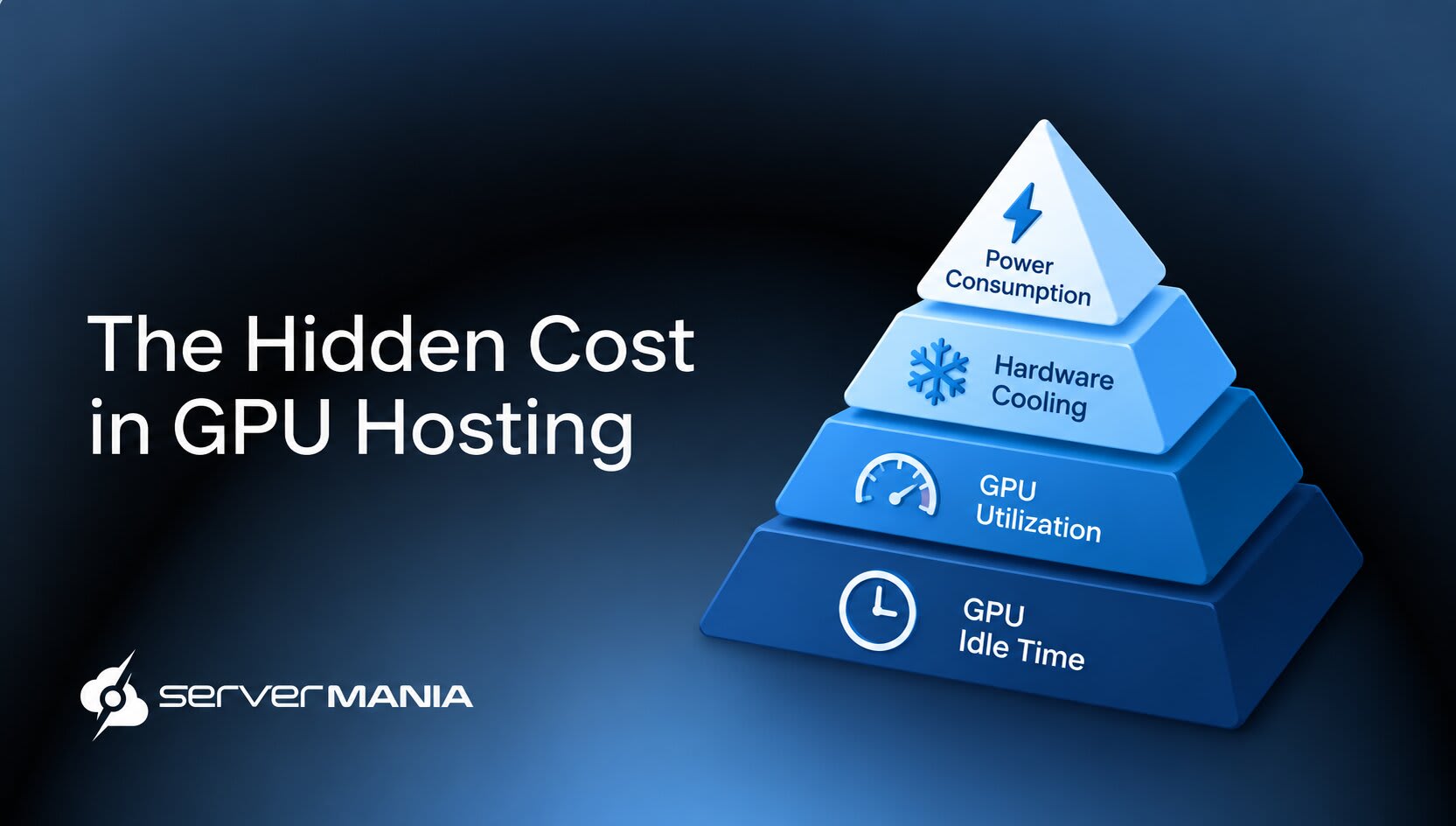
The GPU hosting cost goes beyond the prices shown during deployment. AI developers, businesses, and organizations running machine learning, inference, or other compute workloads need to consider factors like power, cooling, utilization, idle time, and networking to correctly evaluate their infrastructure costs.
ServerMania offers GPU Server Hosting through Dedicated Servers and AraCloud, providing customers with access to dedicated GPU infrastructure for demanding workloads. From AI training and AI inference to machine learning, rendering, and HPC applications, our GPU platforms deliver enterprise performance with predictable pricing, high-speed networking, and scalable infrastructure.
In this guide, we break down the hidden factors behind GPU hosting and show how to reduce spending while getting more value from your GPU infrastructure.
What is GPU Hosting: Infrastructure Requirements
When speaking about GPU hosting, we shouldn’t just imagine a server with a Graphics Processing Unit, but an entire infrastructure revolving around parallel processing. This includes everything, not only the GPU, which often means CPU, RAM, data center, networking, cooling systems, storage, and even more.
Yes, the GPU is often the most costly piece of the infrastructure. It’s the most visible part, but it’s only one component by itself. The thing is that high-end GPUs require infrastructure around them that can support their operation, so they can run effectively.
These supporting components add to the overall GPU hosting cost, meaning the price of the GPU itself does not provide a complete picture of what it takes to run GPU infrastructure.
GPU Hosting Cost: What Are You Actually Paying For?
When you’re going through different providers, their pricing models and advertised costs, you must keep in mind that this might only be a part of what you’re actually paying for. The actual GPU pricing is way too complex to be put in a single sentence, considering that GPU infrastructure handles some of the most modern and demanding tasks such as AI workloads.
GPU pricing often appears as a simple per-hour or per-GPU-hour figure, but the real cost depends on the GPU models, infrastructure, storage, networking, and resources supporting the load. For example, a single GPU running a short AI inference job has a different cost from multi-GPU configurations handling large-scale training or demanding machine learning models.
The pricing also varies between bare metal providers, GPU virtual machines, and cloud GPU providers, which makes cost really difficult to predict. If we consider different models such as pay-as-you-go, on-demand pricing, reserved instances, and spot pricing, it becomes even more challenging to compare.
⚠️In short, a lower GPU hour price does not always mean the lowest cost once utilization, idle capacity, power, cooling, and other infrastructure expenses enter the calculation.
Here’s everything “raw” that contributes to the total cost:
- GPU hardware and rental price
- GPU model and performance
- Number of infrastructure GPUs
- CPU & system memory (RAM)
- The GPUs GB VRAM capacity
- The GPUs power consumption
- Data center tier/electricity costs
- Cooling & thermal management
- Network bandwidth and transfer
- GPU utilization and GPU idle rate
These factors do not affect every single GPU hosting setup the same way. It really depends on the way you are using your infrastructure. A short AI inference job, for example, has different requirements from continuous AI training or large-scale machine learning.
Note: Hidden costs like egress fees can inflate the total cost of ownership. For example, data egress fees add $0.05-$0.12 per GB on most providers.
Hardware and Pricing
In general, GPU hosting is typically advertised as Infrastructure as a Service (IaaS), where you pay to access a complete solution; in this case, GPU instances. The provider supplies the physical servers or cloud servers and offers a complete pacakage: GPU, CPU, RAM, storage, networking, and a data center to house your infrastructure as you’re performing your objectives.
The customer uses those resources to run AI workloads, machine learning, deep learning, rendering, scientific computing, or other compute workloads.
This is where the price is being determined. You typically pay for the entire thing.
The initial GPU pricing therefore reflects much more than the cost of the GPU itself. The GPU model is usually the largest hardware factor. An NVIDIA GPU such as an RTX PRO 5000 Blackwell or L4 Tensor Core has a different acquisition cost based on its performance.
However, beyond the base price you see in the initial deployment platform, there is also a monthly price, which is determined based on your infrastructure factors. They include power consumption, cooling, and data center housing, the way you use your infrastructure, and, of course, the network you are paying for.
Note: Stable Diffusion workloads often fluctuate in GPU utilization during development and testing, creating periods of idle capacity.
Power Consumption
The more powerful the GPU, the more electricity it requires under load. High-end GPUs designed for AI training, deep learning, and other intensive compute workloads requiring parallel processing require substantially higher power levels than lower-end accelerators.
So, a server with multiple GPUs multiplies this demand, while the CPU, memory, storage, fans, and power supplies add their own consumption. As a result, higher GPU power draw increases both the direct power bill and the infrastructure capacity required to operate the server.
This means a high-power GPU has a cost impact beyond its purchase or rental price.
Here’s an example:
| Workload | Utilization | GPU Draw | Server Draw | Energy(24h) | Energy(30 Days) |
|---|---|---|---|---|---|
| Idle/Standby | 0-10% | 50-100 W | 200-300 W | 4.8-7.2 kWh | 144-216 kWh |
| Light Inference | 20-40% | 150-300 W | 350-500 W | 8.4-12 kWh | 252-360 kWh |
| AI Inference | 50-70% | 300-500 W | 550-700 W | 13.2-16.8 kWh | 396-504 kWh |
| Model Training | 80-95% | 500-700 W | 750-900 W | 18-21.6 kWh | 540-648 kWh |
There are 107 GPU models tracked across 4,915 configurations. This means that customization options are practically endless, and determining the price can only be estimated, but never predicted precicely. For instance, the NVIDIA H100 offers 80GB of HBM3 memory and delivers around 3,350 GB/s memory bandwidth. Therefore, the higher VRAM capacity and faster interconnects increase hourly GPU rates.
The takeaway here is that new GPU architectures command a premium compared to older architectures. For instance, the Blackwell Ultra GPU costs around $8.18 per GPU per hour, while the NVIDIA A100 is available in 40GB and 80GB versions coming at around 6,50 per GPU hour.
Disclaimer: Values are illustrative estimates for a single-GPU server. Actual consumption varies by GPU model, server configuration, workload, and power management settings.
Cooling & Data Center
The price for cooling will most likely be included in the monthly price, but it’s critical to understand why it has such a significant impact on the total cost.
Every watt consumed by the GPU and infrastructure as a whole becomes heat that needs to be removed from the hardware so it continues running in a normal temperature range. If we take this one step further with GPU clusters, it’s important to mention that they require data center infrastructure, cooling systems, and power distribution capable of handling high-density hardware.
Another important factor is the data center tier. A higher-class data center facility often means higher operational costs. That’s why choosing a more demanding infrastructure typically means an advanced data center facility, which comes with an additional cost.
The bottom line here is that, based on the selected server infrastructure, the prices can vary significantly based on geographic regions and data center locations.
See Also: How to Validate GPU Health
Utilization and Idling
GPU utilization is one of the leading factors that determine the monthly operational cost. A GPU running an AI training, machine learning, or inference workload at 90% utilization delivers far more productive compute than one operating at 20%, even though the hosting rate remains the same.
This makes utilization especially important for businesses paying per GPU or through hourly billing, since every unused portion of the allocated capacity still contributes to the total GPU hosting cost.
Another thing worth considering is idling. Idling becomes an issue when a GPU remains online without processing meaningful work. For development, data preparation, job queues, failed deployments, and inconsistent workloads all create periods where expensive AI compute sits unused.
For example, paying $4 per GPU hour for a GPU used only 25% of the time produces an effective cost of roughly $16 per utilized GPU hour. Improving the workload scheduling, batching concurrent requests, and releasing on-demand instances when they are no longer needed will help reduce this hidden cost.
Here is an example of GPU infrastructure cost-effectiveness:
| GPU Utilization | Productive GPU Time | Idle Time | Effective Cost at $4/GPU Hour |
|---|---|---|---|
| 20% | 4.8 hours/day | 19.2 hours/day | $20 per productive GPU hour |
| 40% | 9.6 hours/day | 14.4 hours/day | $10 per productive GPU hour |
| 60% | 14.4 hours/day | 9.6 hours/day | $6.67 per productive GPU hour |
| 80% | 19.2 hours/day | 4.8 hours/day | $5 per productive GPU hour |
| 90% | 21.6 hours/day | 2.4 hours/day | $4.44 per productive GPU hour |
The difference becomes substantial over long-running workloads. At 20% utilization, four-fifths of the allocated GPU capacity remains unproductive while the hosting charge continues. At 80% utilization, the same GPU pricing produces four times more productive compute from the same provisioned resource.
For workloads with predictable demand, improving utilization often has a greater impact on the effective cost than finding a slightly lower hourly rate.
Quick Tip: Benchmarking several candidates is important for selecting the right GPU for workload needs.
Networking & Transfer
The network of the infrastructure is the last but not least important factor to consider. It’s a fundamental part of any GPU workload, so every GPU hosting provider includes it by default. For example, AI training workloads continuously access datasets and transfer model checkpoints, while AI inference requires fast communication between the GPU server, applications, and users.
For distributed workloads, GPUs also need fast connections to exchange data during processing. Without sufficient network performance, the GPU sits waiting for data instead of processing it.
High bandwidth, low latency, dedicated network capacity, and fast connections increase infrastructure costs dramatically, while large amounts of data transfer, especially outbound traffic, might add separate charges. So, make sure to evaluate network as well, especially for workloads that will move big datasets.
Note: Managed services and convenience features can add to overall costs of GPU hosting.
How to Reduce GPU Hosting Costs
The most effective way to reduce GPU hosting costs is to eliminate wasted capacity and correctly size the infrastructure based on your workload.
The following strategies target the main sources of unnecessary spending:
- Improve Utilization: Keep GPUs actively processing workloads instead of paying for unused capacity.
- High GPU Efficiency: Select a GPU that delivers the required performance without excessive compute capacity.
- Reduce Idle Time: Try to shut down or release GPU resources when workloads are not running (available with cloud hosting).
- Optimize Workloads: Improve code, batch processing, and model efficiency to reduce GPU processing time.
- Use Flexible Pricing: Use spot or reserved pricing when your workload allows lower-cost alternatives to on-demand rates.
- Consolidate Workloads: Run compatible workloads on the same infrastructure to reduce the number of provisioned GPUs.
- Optimize Data Transfer: Keep frequently accessed data close to the GPU to reduce bandwidth usage and transfer charges.
Reserved pricing locks in rates for 1-3 months at 20-40% savings. It suits predictable workloads where GPU capacity remains consistently in use. This approach reduces the effective hourly rate while offering more predictable infrastructure costs.
Note: Spot instances are the cheapest option but come with potential service interruptions. Spot pricing can save 50-80% compared to on-demand rates.
Dedicated GPU Servers vs Cloud GPU Instances
The first thing to know is that GPU prices can vary by over 100x depending on the provider, whether it’s a bare metal server or a cloud GPU provider. Cloud GPU prices range from $0.01 to $960 per hour, while bare metal requires more commitment, typically starting at a flat monthly rate for the entire infrastructure.
💡The right option depends largely on how consistently you use the GPU.
Cloud instances often make sense for short-term projects, variable workloads, testing, and projects with unpredictable GPU demand. Dedicated GPU servers tend to become more cost-effective when you need the same GPU infrastructure running continuously, since a fixed monthly price avoids paying a premium for flexible hourly access. It’s all down to intent.
Note: Cloud GPU instances can be upgraded after a reboot, while dedicated servers require significant downtime because of the necessary on-site intervention.
GPU Solutions Made Simple at ServerMania!

ServerMania provides a cost-effective option for GPU workloads with dedicated infrastructure and GPU Servers built around your requirements. Our fully customizable hardware, guaranteed availability, and top-tier data centers across Canada, North America, and Europe give you the flexibility to configure the right setup without relying on shared spare capacity.
Build your GPU environment around the resources your workload needs, from a single GPU to multi-GPU configurations, and high-performance networking with up to 4 x 25 Gbps bandwidth.
💬If you have any questions, get in touch with our 24/7 customer support or book a free consultation to discuss your GPU deployment with an expert. We’re available right now!
See Also: Dedicated Server Cost vs Cloud Server Cost vs Colocation Cost
Frequently Asked Questions:
What are the cheapest cloud GPU provider options?
The cheapest cloud GPU provider depends on GPU type, region, and billing model, with the cloud GPU market changing frequently. Compare the GPU hr rate, cloud GPU pricing, and resource limits rather than selecting the lowest advertised rate.
How do I compare GPU hosting prices?
To compare prices, check current GPU prices updated by each provider and account for the advertised price, storage, bandwidth, and usage fees. A competitive marketplace with dynamic pricing might offer lower prices, while fixed pricing provides greater predictability.
What is the cheapest GPU for AI workloads?
The cheapest GPU depends on the workload, with different GPU classes suited to different performance requirements. An RTX A6000, or NVIDIA L4 Tensor Core, for example, offers substantial VRAM for AI models, while newer high-performance GPUs suit demanding workloads.
Are cloud GPUs suitable for AI model training?
Yes. Multi-GPU instances provide GPU acceleration for demanding AI model training, while multi-GPU clusters support larger workloads and distributed processing. These configurations suit fine-tuning, large language models, and other compute-intensive applications.
Is a community cloud secure for AI applications?
A community cloud provides shared infrastructure for organizations with similar requirements, while a secure cloud focuses on isolation and access controls. Providers targeting enterprise workloads often add enterprise-grade security, which matters when running sensitive AI applications.
How Should You Choose Between Cloud GPU Providers?
Different cloud providers offer different GPU models, pricing, and infrastructure configurations, so the lowest hourly rate does not always deliver the best value. Consider your workload requirements, required GPU availability, performance, bandwidth, and billing model to choose infrastructure that serves you best.
Was this page helpful?
About the author