Multi-Tenant Hosting on Dedicated Servers: Users, SSH Keys, Backups, and Resource Limits
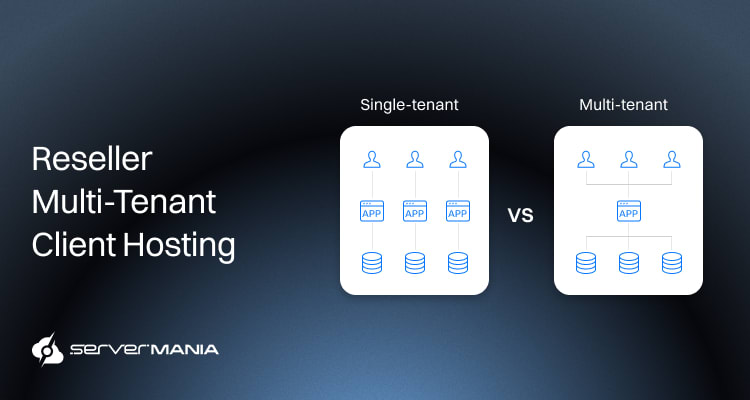
Managing multiple tenants on a single physical server has become a practical strategy for resellers, but maximizing efficiency, security, and control isn’t that simple. When structured properly, multi-tenant hosting allows providers to perform at scale by consolidating workloads, simplifying management, and making better use of available infrastructure.
Here at ServerMania, we have helped businesses for over 20 years build and expand high-performance hosting environments through enterprise-grade dedicated and cloud solutions.
Whether you are launching your first reseller setup or scaling into a larger infrastructure, this guide goes over everything you need to know and be prepared for.
Why Resellers Use Multi-Tenant Hosting on a Single Server
For many resellers, whether it’s agencies or managed service providers, multi-tenant client hosting on a single dedicated server is a great way for infrastructure consolidation.
This is a practical way to host multiple users without having to deploy infrastructure for every project. Multi-tenant hosting on a dedicated server is a hybrid hosting model where multiple users share the resources of a single, physically dedicated server.
Using a single dedicated server for multi-tenant hosting offers a balance between the performance of bare-metal hardware and the cost-efficiency of resource sharing. This way, resellers can retain all the advantages of the dedicated hosting, establishing access controls, server settings, hardware, and more.
Client Consolidation
The primary reason and undoubtedly the biggest advantage of multi-tenant client hosting is the ability to house several customers on a single machine. Also called “consolidation”, this reduces the need for separate infrastructure for each project, dramatically decreasing the day-to-day administration hurdle.
Logically isolated environments allow different clients to share the same physical server, enhancing resource efficiency while maintaining security. Each tenant has their own “apartment” (a virtual server or container) with their own key (isolated access).
Infrastructure Cost
The second advantage here is infrastructure cost. It’s much cheaper for resellers and agencies to manage fewer physical machines for more clients. This is because purchasing a separate server for each customer can quickly become too expensive. Hence, multi-tenant client hosting is excellent for startup businesses and small businesses with moderate resource usage requirements.
The dedicated servers provide exclusive access to all resources, such as CPU, RAM, storage, and bandwidth, ensuring no competition for resources from other users. At the same time, deploying a Virtual Private Server (VPS) also ensures locally isolated resources, eliminating the “sharing” nature.
How to Structure Multiple Users on the Same Server
Housing multiple users on the same server isn’t as simple as creating a few login credentials and then just letting everything flow. Reseller services have to establish an infrastructure within the dedicated server that can provide reliable isolation for each user.

This means segmentation; each user account must remain isolated, permissions need to stay in control, and client workloads must not interfere with each other.
A single configuration mistake can lead to data exposure, permission conflicts, or unintended visibility that can lead to critical organization failures. These strict logical boundaries prevent one tenant from accessing another’s data, ensuring security and privacy.
To strategically deploy each segmentation aspect, we’re covering the top three:
1. Account Separation
The first and perhaps most important step is separating each client into its own dedicated account. This means that every tenant must have an independent operating system profile, with isolated permissions, and structured ownership over files, databases, and applications.
One of the most common reseller mistakes is allowing multiple users to work under one administrative (master) profile. This is not a good isolation. This is unnecessary risk, weak accountability, and makes troubleshooting much harder than it’s supposed to be normally.
Instead, resellers, agencies, and providers should map each and every tenant to a dedicated account with clearly assigned ownership and directory restrictions.
Here’s how the single-server multi-tenant hosting administrative structure looks in popular industries:
| Client Workload: | Optimized Structure: |
|---|---|
| Small Brochure Websites | Separate operating system admin accounts. |
| eCommerce/Storefronts | Isolated virtual machines (VMs) or containers |
| Enterprise/Custom Apps | Dedicated environment with permissions config |
| Database-Heavy Apps | Segmented database ownership and file paths |
Both virtualization and containerization technologies divide the physical hardware into multiple virtual environments. It is an administrative structure, and it is what determines the ease of operational clarity.
2. SSH Authentication
Once you have all the accounts separated, the remote access should be configured through SSH key authentication. This is critical, as relying solely on passwords can expose gaps vulnerable to intrusion, such as brute-force login attempts. Each user should receive their own authentication pair tied directly to their account permissions, which will ensure that credentials remain unique and traceable across all hosted environments. An ultimate protection closing all vulnerability gaps, securing your environment.
We have a detailed step-by-step guide on how to protect SSH login access by disabling root SHH login and enforcing key authentication.
Here are the best practises for SSH authentication:
- Set up a unique SSH key for every client administrator
- Disable password-only authentication where possible
- Rotate the SSH keys periodically for improved security
- Restrict SSH login paths to approved IPs when feasible
- Delete inactive credentials immediately after offboarding
This is an all-in-one strategy to guarantee no unauthorized access throughout your environment and a very strong credential management system.
See Also: Linux Server Hardening Checklist
3. Full Access Controls
The access controls are the last, but not least important layer of protection. This access control will set boundaries for each tenant, regarding what they can view, edit, and execute within their isolated piece. Using permissions, we can prevent unauthorized actions and secure the integrity of the environment.
The security complexities arise from multiple tenants sharing the same underlying operating system or database, which can lead to data leakage if misconfigured.
Therefore, role-based permissions should define exactly which services, directories, and administrative functions each user can interact with.
For example, a developer may need deployment permissions but should not have root-level access to server settings or backup software.
For Linux-based environments, direct root SSH access can be disabled by editing the SSH daemon. You can lock down remote access and assign specific commands for each user. This way, if a client account becomes compromised, limited permissions reduce the exposure and help contain the incident before it affects other users or other websites on the same server.
Server Resources Allocation Approach
The next important aspect is server resource allocation. Proper server resource allocation is one of the most important parts of maintaining a stable environment. When multiple clients are sharing the same physical server, each tenant must receive a finite amount of dedicated hardware resources (CPU, memory, storage, and network).
Without structured allocation policies, one heavy workload can degrade performance for every other account hosted on the machine. Effective resource management helps keep your site running smoothly within its allocated capacity, while also allowing you to plan for future growth.
Multi-Tenant Resource Limit
Resellers need to set a clear resource limit for each user. Resource quotas are set to limit how much CPU or memory any single tenant can consume to prevent a “noisy neighbor” issue. Without the quotas in place, a single account may consume disproportionate CPU usage, RAM, or storage bandwidth and negatively affect other users on the same server.
Administrators typically define allocation thresholds based on the client’s hosting package, workload type, and expected traffic volume. The higher-tier customers may receive additional memory, CPU, or storage allotments, while smaller websites operate under lighter limits.
The resource limitations are commonly configured based on:
- Maximum CPU percentage per tenant
- Allowed RAM and memory allocation
- Storage quotas for files & databases
- Concurrent process & Disk I/O limits
To limit the resources per tenant, resellers often use OS-level tools like VM platforms, containerization, and more, based on how the environment is structured. Some of the most common examples include Linux cgroups, Docker resource flags, hypervisors like VMware or Proxmox, and virtual machines (VMs).
Resource Abuse Prevention
Abuse prevention is another critical step, especially whenever multiple users are operating on the same server. It’s enough for just one poorly optimized application, or an inability to handle a traffic spike, to overwhelm the physical server, especially without proper prevention.
For example, when your website is hitting one or more of its hosting account resource limits, it can result in ‘Resource Limit Reached‘ errors or slow down the website.
Scenarios include excessive cron jobs, runaway scripts, or poorly optimized database queries that, if left unchecked, execution can lead to resource insufficiency and impact each tenant in the environment.
To reduce abuse risks, resellers often implement:
| Protection Method: | Primary Purpose: | Common Tools: |
|---|---|---|
| Process Throttling Rules | Limits how much CPU or processing power a workload can use. | Linux cgroups, or “cpulimit“. |
| A Request for Rate Limits | Restricts excessive requests during heavy traffic or abuse. | NGINX, Apache “mod_evasive“. |
| Concurrent Connection Limits | Caps active user/application connections. | NGINX limit_conn, HAProxy. |
| Container or VM Isolation | Separates tenants into isolated environments. | Docker, VMware, Proxmox. |
| Workload Suspension Triggers | Stops the workloads that exceed predetermined limits. | CloudLinux LVE, monitoring scripts. |
The main purpose of these security limits is to prevent one problematic account from impacting other websites or workloads in the same environment.
Client Resource Monitoring
Continuous monitoring is essential for understanding how tenants consume the available capacity over time. Without visibility into resource usage, administrators cannot identify bottlenecks, predict scaling needs, or optimize server configurations effectively. The CPU, RAM, and I/O don’t operate in isolation; they function as a unified system that collectively determines your website’s performance.
Note: I/O refers to the processes that read or write data to storage devices, such as accessing files or interacting with databases.
If your CPU reaches 100%, it means that your account is using all of the CPU resources allocated, and any new processes will be put to sleep until existing processes complete.
Monitoring tools help track tenant consumption across all major performance metrics. Administrators should pay close attention to CPU usage, RAM allocation, and storage throughput because spikes in one area often affect the rest of the system.
Note: If a tenant consistently pushes their hardware limits, it may indicate a need for plan upgrades or infrastructure expansion.
Backup & Disaster Recovery: Best Practises
Using backup storage is crucial for modern organizations to implement a backup strategy for robust data protection, disaster recovery, and business continuity. Backup storage is a physical machine or virtual space used to store duplicate copies of data to protect against loss or corruption in the event of a technical failure or cyberattack. Backup storage solutions can include cloud storage, backup servers, hard drives, and network-attached storage (NAS), each with distinct benefits.
💡 A single point of failure exists in multi-tenant hosting because if the physical server fails, all tenants go offline simultaneously.
Dedicated Backup
Most resellers use a separate dedicated server. A backup server is dedicated purely to storing backup data from other devices, ensuring files can be restored in case of a disaster or technical failure. This is convenient for larger reseller operations as dedicated servers can be customized to fit specific needs, including hardware options and operating systems, providing flexibility as business requirements evolve.
It means tailoring the server by connecting more external hard drives, establishing automated backups, and sacrificing unnecessary performance like CPU/GPU for high performance and cost effective way to deploy the exact resources you require.
See Also: Server Storage Requirements
Cloud Backup
Another option is cloud server storage. Cloud storage is a highly effective backup solution as it offers simplicity, scalability, and can be accessed anywhere with an internet connection. You receive storage as per your requirements, with scalability and flexibility without overpaying for space you won’t utilize.
As your reseller operation grows and backups start scaling, using cloud backup solutions can scale quickly and accordingly, based on user requirements.
Note: The backups should never be stored locally in the multi-tenant environment!
The Limits of Hosting Too Many Clients on One Server
While multi-tenant hosting tremendously improves efficiency, everything has a limit. A single physical machine has so many available resources, and pushing too many clients on the same server can often lead to performance degradation, uptime issues, and added complexity.
Bottlenecks
Dedicated servers are ideal for high-traffic websites or resource-intensive applications due to their superior speed and performance. However, too many clients on a single machine start consuming resources really quickly.
This becomes especially problematic when several tenants experience peak traffic simultaneously. However, even the most powerful infrastructure has limits. When tenant demand exceeds available server resources, all hosted accounts begin experiencing slower responses and delayed processing.
Complexity
The server provider manages security patches, operating system updates, and backups for the entire server, providing “hands-free” maintenance. With too many tenants on the same physical server, this could become an operational overhead, especially when resource deficiency keeps making it harder.
Resellers often reach a point where maintaining one oversized hosting node becomes less efficient than distributing workloads across multiple systems. Adding more resources, features, and greater control could be the best solution and reliable option for scaling your infrastructure.
Scalability
In a shared hosting environment, multiple websites run on the same physical server and share a pool of resources, including CPU, RAM, and disk I/O.
When those resources are not enough for all tenants, the resellers start to look for ways to grow their infrastructure. This means moving to high-demand tenants into isolated virtual machines, deploying extra dedicated servers, or expanding into cloud infrastructure allows providers to continue growing without sacrificing performance or tenant experience.
Note: Scalability is easier in a virtualized environment than in a physical one, facilitating growth.
Scaling Beyond a Single Server at ServerMania

If you’re just starting or your reseller business grows, one server may no longer be able to house all the tenants’ load without performance drawbacks.
Here at ServerMania, we support both your starting infrastructure needs and your long-term growth by offering dedicated servers and instant dedicated servers. When combined with our cloud solutions for backup storage, you have everything you need to complete the reseller shared resources environment.
With full customization options and advanced security measures, providers gain the flexibility to grow while maintaining stronger tenant isolation and supporting data sovereignty requirements.
💬 If you have questions, get in touch with our 24/7 customer support or book a free consultation with a multi-tenant client hosting expert.
Was this page helpful?
About the author